The TL;DR your campaigns deserve.
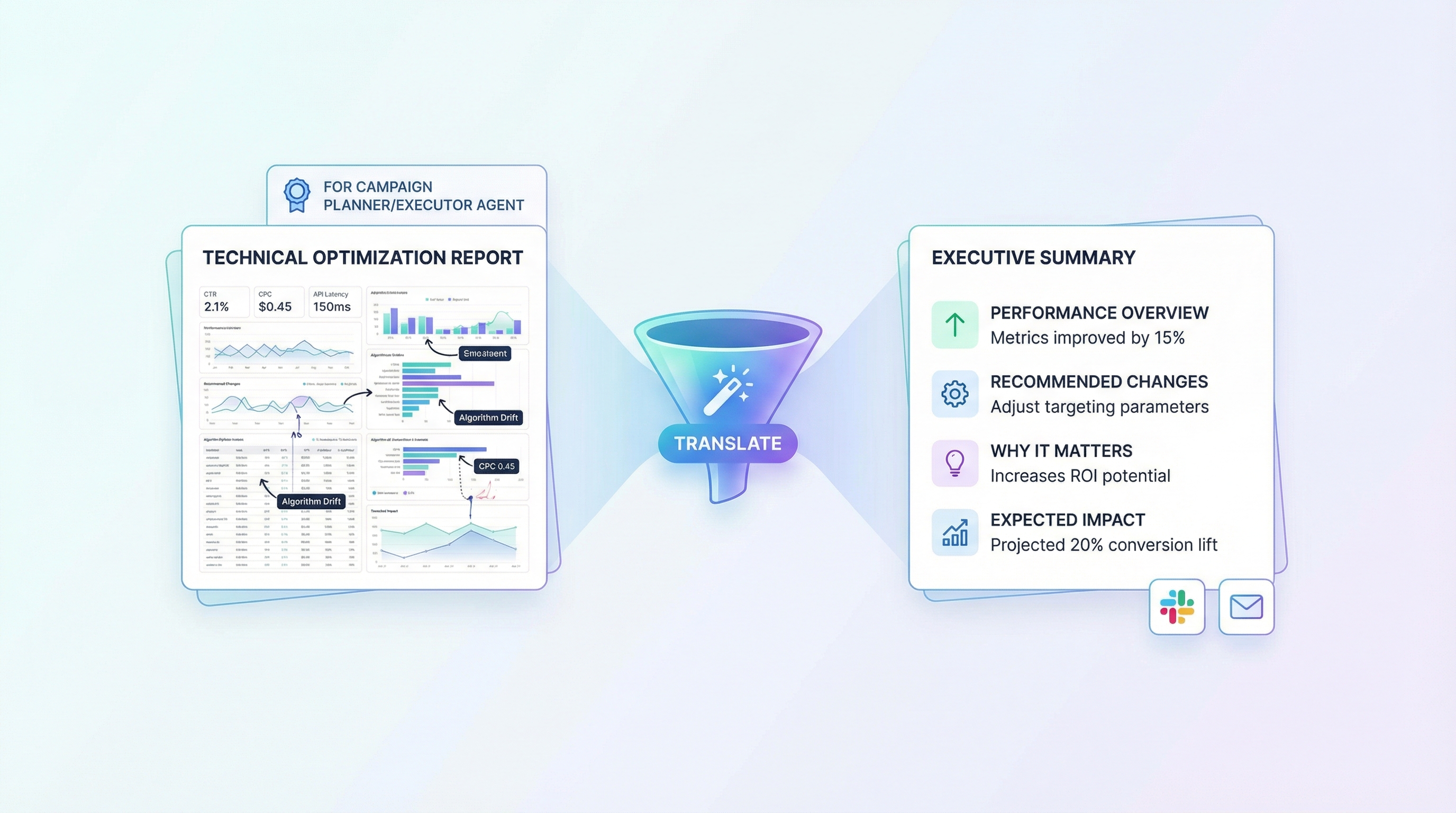
Your Campaign Analyst just produced a detailed performance report. It's thorough. It's data-rich. It's... a lot.
Ad Digest Pro takes those dense technical analyses and turns them into clear, scannable summaries anyone can understand. No jargon. No stat-speak. Just what's happening, what to do about it, and why it matters.
What it does:
- Translates complex campaign analysis into plain English
- Highlights what's working, what's not, and what to change
- Consolidates multiple reports into one coherent action plan
- Creates executive-ready summaries you can share with stakeholders
Why you'll love it:
- Read a full campaign update in 2 minutes flat
- Finally, understand what all those metrics actually mean for your business
- Share insights with your team without explaining every acronym
- Stay informed without drowning in data
Part of the AdHive suite:
Ad Digest Pro works hand in hand with Ad Analyst Pro. Set up automated reviews and get plain-English summaries delivered on a schedule — so you're always in the loop without doing the legwork.
Because the best insights are the ones you actually read.
Learn More
Use Case Scenarios
Marketing Teams Processing Campaign Performance Data: When your analytics team delivers dense technical reports filled with statistical breakdowns, conversion metrics, and algorithmic recommendations, Ad Digest Pro distills these into executive summaries that highlight what actually changed, why it matters, and what to do next. Decision-makers get clarity without drowning in data.
Agency Account Managers Briefing Clients: Agencies managing multiple ad campaigns often struggle to translate internal optimization findings into language clients understand. Ad Digest Pro converts technical analysis into professional, jargon-free summaries that build confidence and justify optimization spend while maintaining technical credibility.
Performance Marketing Directors Tracking Portfolio Health: When managing dozens of campaigns across channels, directors need to quickly identify which optimizations are working and where attention is needed. Ad Digest Pro transforms detailed optimization reports into concise, prioritized insights that enable faster strategic decisions.
Cross-Functional Teams Aligning on Campaign Changes: Technical specialists and non-technical stakeholders often misunderstand each other's reports. Ad Digest Pro bridges this gap by creating a shared language—clear summaries that technical teams respect and business teams can actually act on.
Budget Allocation Reviews: During quarterly planning or budget discussions, stakeholders need to understand optimization impact without technical deep-dives. Ad Digest Pro presents campaign analysis in business-outcome language, making ROI and efficiency gains immediately visible.
Applications
Digital Marketing Agencies: Ad managers and account teams use Ad Digest Pro to communicate campaign optimization work to clients, maintaining transparency while keeping presentations focused and professional.
E-Commerce Operations: Marketing and operations teams leverage the tool to quickly understand how campaign adjustments affect conversion funnels and revenue, enabling faster decision-making during peak seasons.
Enterprise Marketing Departments: Large organizations with specialized analytics teams use Ad Digest Pro to distribute insights efficiently across product, finance, and executive stakeholders without losing technical accuracy.
Performance Marketing Consultants: Independent consultants and fractional CMOs use the tool to deliver high-value client briefings, positioning themselves as trusted advisors who translate complexity into strategy.
SaaS Marketing Teams: B2B marketing leaders use Ad Digest Pro to track customer acquisition optimization and present findings to sales leadership and executive teams in outcome-focused language.
Expand this agent's potential
Unlock more possibilities by combining this agent with the following.
 HubSpot User Reporting
Access, report on, and manage contacts, deals, and tickets in your HubSpot CRM.
 Google Looker Reporting
Retrieves onboarding funnel data from Google Looker for weekly or monthly reporting.
 Google Analytics Reporting
Analyzes your Google Analytics 4 data to provide reports, real-time insights, and actionable recommendations.
 Google Search Console Reporting
Analyzes your Google Search Console data to optimize website search performance.
 Google Ads Performance Reporter
Compare Google Ads performance across equal-length periods with factual metrics, anomaly flags, and downloadable PDF reports