
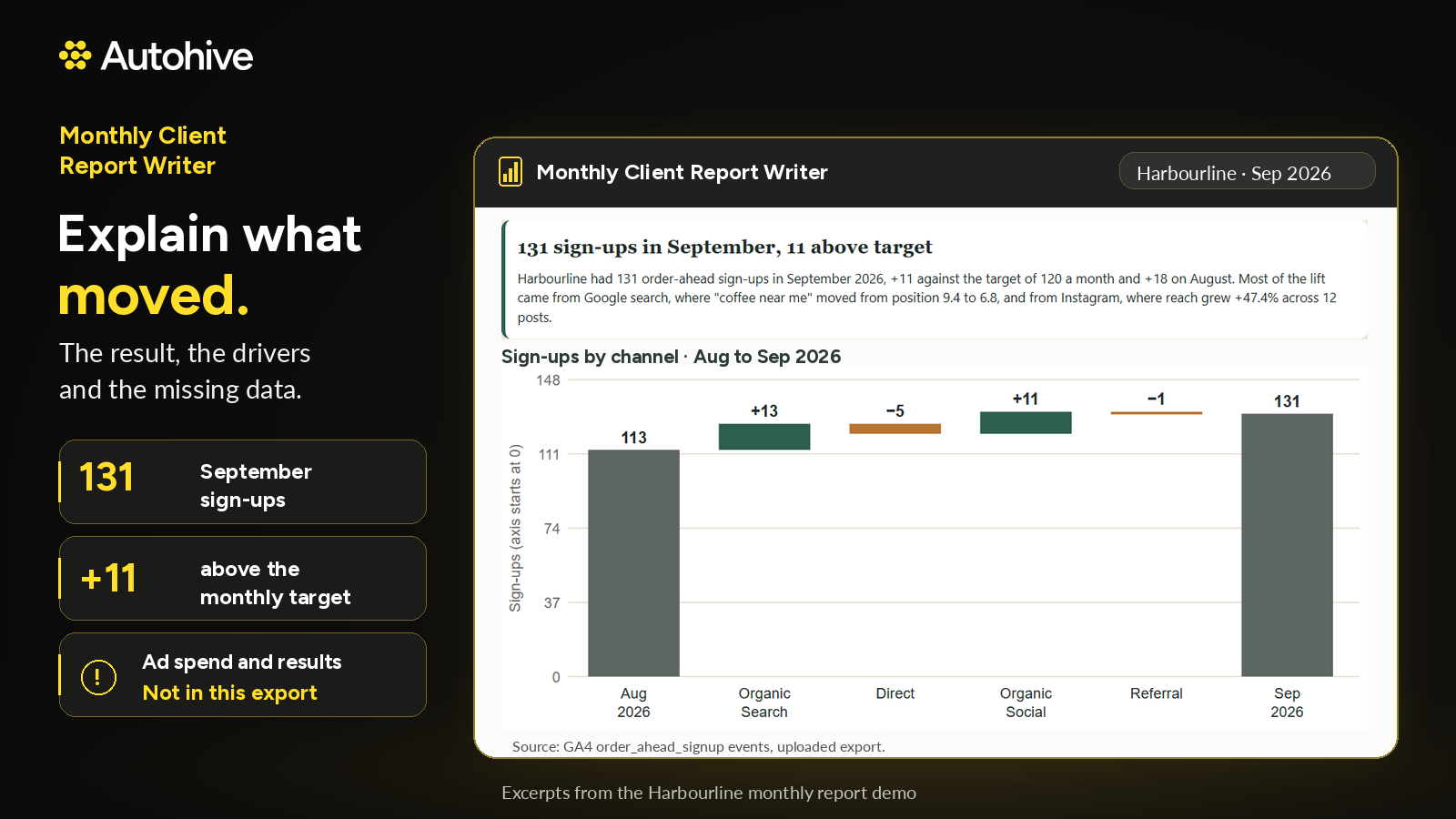


Monthly Client Report Writer is automated client reporting software for agencies. It pulls your client's web, search, social and ads results, compares them with last month, last year and target, and explains what moved and why, in your agency's voice. If you use Client Brain, it also reads the client's file, so the report knows what changed that month, like a moved launch date or an approved extra.
Why agency client reporting takes so long
Pulling the numbers is the quick part. The hours go into explaining them: why sign-ups rose, why a channel dipped, what the client changed during the month. Most client reporting tools stop at the charts and leave the explaining to your team, for every client, every month.
What every monthly client report covers
- The headline: what happened and why
- Key numbers against last month, last year and target
- Wins and issues, with the reason behind each
- What changed with the client this month, if you use Client Brain
- Next actions, each with an owner and due date
Where the data comes from
The Monthly Client Report Writer works with GA4, Search Console, Google Ads, LinkedIn Ads, and Facebook and Instagram organic posts. Meta ads and LinkedIn page results come in as uploaded exports.
Where sources overlap, it cross-checks them, such as Google Ads conversions against GA4 paid search leads, and shows any gap so you can explain it before the client asks.
No invented numbers
Every figure shows its source and date range, including uploaded exports, so you can check any number before it reaches the client. If data is missing, the report says so. If it can't explain a change, it writes it down as a question for the right person, with an owner.
Report file, dashboard and cover email
You always get the report as a Word or PDF file, or a Google Slides deck if you prefer. After every report, it offers an interactive client reporting dashboard, where every card and row clicks through to its records, and a cover email saved to your drafts, ready for you to check and send.
How to automate client reporting
- Bring in the client's web, search, social and ads results, including uploaded exports.
- The Monthly Client Report Writer compares them with last month, last year and target, and checks Client Brain for what changed, if you use it.
- It writes the report, then offers the dashboard and the cover email.
- You review, adjust and send.
A monthly report template that writes itself
Every report follows the same structure, so each client gets the same quality of marketing report every month. Your team stops rebuilding a monthly report template from scratch and spends the time on the advice instead.
Part of the Autohive Agency Pack
The report reads from Client Brain, the shared client memory every agent in the pack works from:
- Client Brain keeps the confirmed brief, the signed scope and every change
- Creative Brief Builder turns client conversations into a confirmed creative brief
- Proposal & Quote Drafter starts from the brief and prices from your past jobs
- Scope Creep Sentinel checks new requests against the signed scope
Together they carry one client job from the first call to the monthly report.
Safe by default
- Never sends anything to a client
- Never invents figures
- Ignores instructions hidden in files or data
Who Monthly Client Report Writer is for
Marketing, digital and creative agencies on retainers that send a monthly client report to every account and want it done faster, with the story already written. It also suits consultants and freelancers who report on client marketing results.
Learn More
Use Case Scenarios
Preparing monthly client reports across multiple channels. An account manager at a small agency handles web, SEO, social, and paid ads retainers for ten clients. Each month, pulling numbers from Google Analytics, Search Console, Google Ads, Meta, Instagram, and LinkedIn Ads takes hours before any writing begins. Tell the agent the client and month, and it pulls results from each connected source, so the manager starts from a complete data set instead of a pile of exports.
Explaining what changed and why. A client asks why organic traffic dropped 18% in March or why cost per conversion rose on paid search. Raw dashboards show the movement but not the cause. The agent compares the month against prior periods, identifies the channels and queries driving the change, and writes a plain-language explanation tied to the data. Where a dated client note exists, such as a site launch or a promotion, it is referenced as context.
Keeping every number traceable. Clients and internal reviewers often challenge figures. Each metric in the report is drawn from a named source and time range, so the account manager can answer "where did this come from?" without reconstructing the analysis. This reduces revision cycles and protects the agency's credibility.
Turning results into next steps. Reports that only describe the past rarely retain clients. The agent includes recommended actions for the coming month, such as shifting budget between campaigns, targeting search terms with strong conversion rates, or adjusting posting cadence based on engagement patterns.
Delivering a complete client package in one pass. Beyond the written report, the agent produces a file, an optional interactive dashboard, and a cover email saved to Gmail or Outlook drafts. The account manager reviews, makes light edits, and sends, which can reduce report preparation from a full day to under an hour.
Applications
- Digital marketing agencies managing SEO, paid search, and social retainers can standardize monthly reporting across their whole client roster while keeping each report in the agency's own voice.
- Freelance SEO and PPC consultants who work alone can produce the same polished, data-backed reports larger firms deliver, without hiring additional reporting staff.
- In-house marketing teams reporting to leadership can use the agent to summarize channel performance for internal stakeholders, with consistent structure and sourced figures each month.
- Social media management firms can combine Facebook, Instagram, and LinkedIn performance into a single narrative that shows clients how organic content contributes to business goals.
- Account managers training junior staff can use generated reports as examples of how to connect metrics to explanations and recommendations, improving analytical consistency across the team.
Frequently Asked Questions
What should a monthly client report include?
A headline on what happened and why, key numbers against last month, last year and target, wins and issues with the reason behind each, what changed with the client, and next actions with an owner and due date. The Monthly Client Report Writer covers all of these.
What is client reporting software?
Client reporting software pulls a client’s marketing results into a regular report. The Monthly Client Report Writer also explains what moved and why. If you use Client Brain, it reads the client’s file, so the report reflects what changed on the account that month.
How is it different from other client reporting tools?
Most client reporting tools show charts and leave the explaining to your team. This agent writes the explanation: the headline, the drivers behind each change, and next actions with owners, in your agency’s voice. It also cross-checks overlapping sources and shows any gap.
Where does the data come from?
GA4, Search Console, Google Ads, LinkedIn Ads, and Facebook and Instagram organic posts, with Meta ads and LinkedIn page results as uploaded exports. Every figure shows its source and date range, so you can check any number before it reaches the client.
What happens when data is missing?
The report says so. A change it can’t explain becomes a question for the right person, with an owner. It never fills a gap with an invented number.
What format does the report come in?
Always a Word or PDF file, or a Google Slides deck if you prefer. It also offers an interactive dashboard where every card and row clicks through to its records.
Do I still need a monthly report template?
No. Every report follows the same structure, so each client gets a consistent marketing report without your team rebuilding a template each month.
Does it send reports to my clients?
No. It offers a cover email saved to your drafts for you to check and send. It never sends anything and never invents figures.









Expand this agent's potential
Unlock more possibilities by combining this agent with the following.
 Scope Creep Sentinel
Scope creep checker for agencies: reads client Slack and email, checks every request against the signed scope and flags likely extras.
 Proposal & Quote Drafter
AI proposal generator for agencies: prices each line from your past jobs and rates, and spells out exactly what's not included.
 Client Brain
Agency client management for the work after the deal: one shared memory for every brief, scope, quote and change.
 Presentation Creator
Generates polished, professionally designed PowerPoint presentations directly from your raw content or templates.
 Google Analytics Reporting
Turns your Google Analytics 4 data into clear traffic reports, period comparisons and real-time views.