
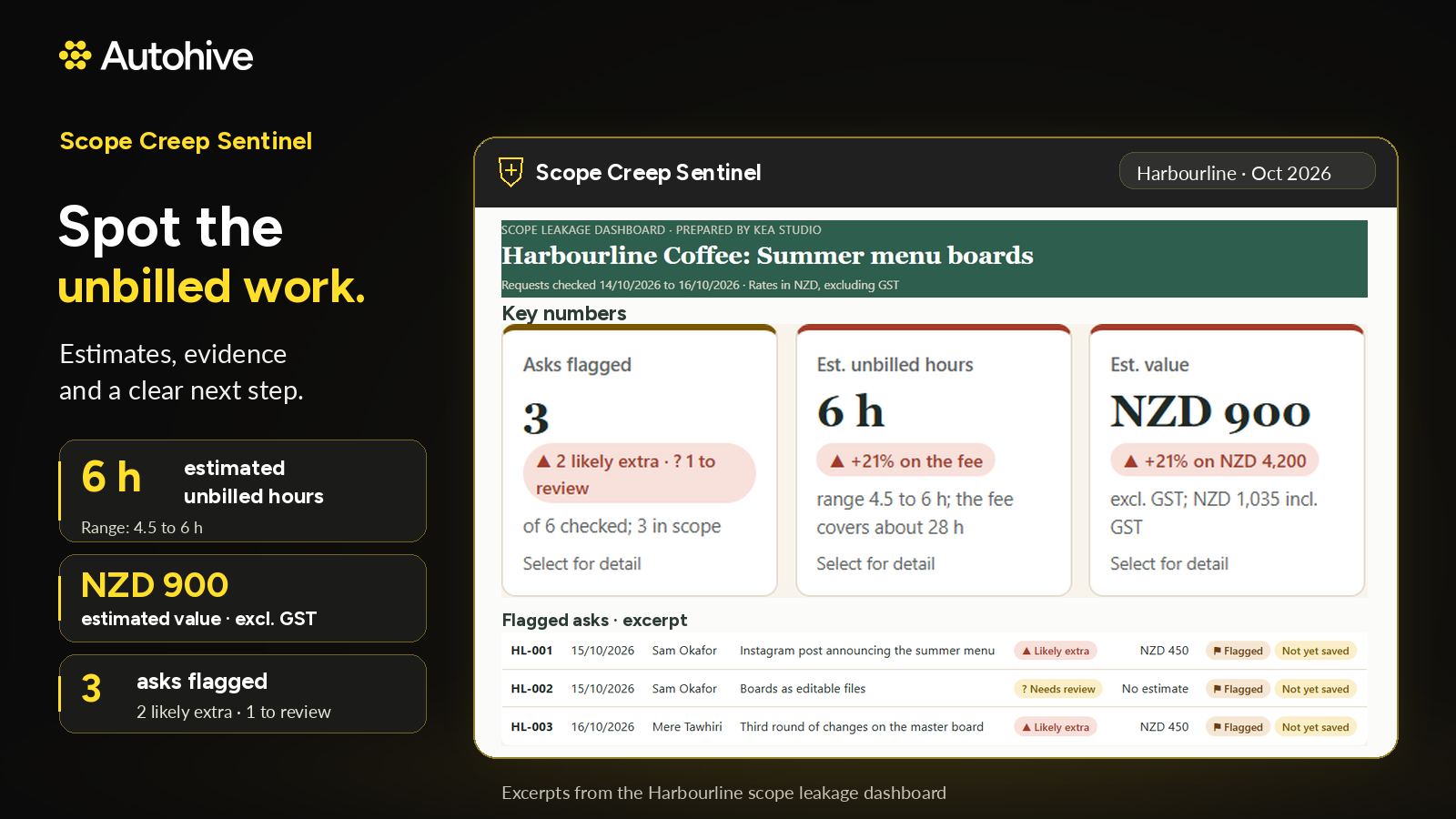


Scope Creep Sentinel catches scope creep before it eats your margin. It reads your client's Slack, email and meeting notes, checks every new request against the signed scope, and gives each one a verdict: in scope, likely extra, or needs review. For every likely extra, it writes a priced change order and a friendly reply to the client, ready for you to check and send.
What is scope creep?
Scope creep is work that grows beyond what was agreed, one small request at a time, without the fee or timeline changing to match. In project management it's one of the most common reasons jobs run over budget. In agencies working on a fixed fee or retainer, it's one of the main reasons work loses money.
Scope creep examples every agency knows
- "Just one more round"
- "Can you also do the socials?"
- "Quick resize for the other formats"
- "Can we swap the photos while you're in there?"
Each one feels too small to flag as out of scope work. Together they add up to hours you never bill.
How Scope Creep Sentinel catches it
Scope Creep Sentinel reads the client's Slack, email and meeting notes, so asks made on calls are caught too. Every new request is checked against the signed scope and gets one of three verdicts:
- In scope: covered by what was signed, so carry on
- Likely extra: outside the signed scope, so quote it, swap it or hold it
- Needs review: unclear, so you make the call
It checks Client Brain first, so extras the client already approved on a call or in Slack aren't flagged again.
Revision rounds, counted
For every deliverable, it shows the revision rounds used against the rounds included, so you know exactly when a job has gone past what was agreed.
Priced change orders and friendly replies
For every likely extra, it writes a change order, sometimes called a change request, and a friendly reply to the client. Several extras that arrive together get one combined reply.
Each change order is estimated from your past jobs (Harvest, Xero, an uploaded export, or your rate), with the jobs it's based on listed for your team and kept out of the client email.
The reply gives the client three ways forward: go ahead as a change order, swap it for something in scope, or hold it for a later phase. It can save the reply as an email draft in Gmail or Outlook, ready for you to check and send.
See what's leaking
After every check, it offers a dashboard of what's leaking: likely extras, estimated unbilled hours and value, revision rounds, and requests waiting for review. You can see where unbilled work is building up before it shows in the margin.
Works with your own signed scope or statement of work
No proposal in Autohive? Upload or paste your signed scope or statement of work, or point it to the file in Google Drive, OneDrive, SharePoint, Dropbox or Box. Scope Creep Sentinel turns it into the saved scope once you confirm. It can also check a pasted client message against a pasted scope, with nothing connected.
How to handle scope creep with AI
- Scope Creep Sentinel reads the client's Slack, email and meeting notes.
- Each new request is checked against the signed scope and given a verdict.
- For likely extras, it writes a priced change order and a friendly reply.
- You decide whether to go ahead, swap it or hold it, and send the reply yourself.
How to avoid scope creep in the first place
The best way to prevent scope creep is to start from a confirmed brief and a signed scope. The Creative Brief Builder confirms the brief, and the Proposal & Quote Drafter writes a clear "not included" list and saves the agreed scope once the client accepts. Scope Creep Sentinel then checks every request against it.
Part of the Autohive Agency Pack
Scope Creep Sentinel works from Client Brain, the shared client memory every agent in the pack works from:
- Client Brain keeps the confirmed brief, the signed scope and every change
- Creative Brief Builder turns client conversations into a confirmed creative brief
- Proposal & Quote Drafter prices from your past jobs and saves the agreed scope
- Monthly Client Report Writer reads the client's file to know what changed that month
Together they carry one client job from the first call to the monthly report.
Safe by default
- Never sends anything to a client
- Never invents figures
- Flags instructions hidden in client messages instead of following them
- Never tells you a client agreed to something unless their own message says so
Who Scope Creep Sentinel is for
Creative, design, digital and marketing agencies working on a fixed fee or retainer, where unbilled extras hit margin directly. It also suits freelancers and consultancies who want a clear, friendly way to raise extra work with clients.
Learn More
Use Case Scenarios
Client requests that quietly expand the project. A client asks for "just one more logo variation" in a Slack thread, then a homepage redesign in an email two days later. Scope Creep Sentinel reads each request against the signed scope and labels it as in scope, extra, or worth a look. Your account manager sees which asks fall outside the contract before the work starts, not after.
Revision rounds that never end. Feedback arrives in scattered emails, comments, and chat messages, and nobody is sure whether round three has already happened. The agent counts revision rounds per client against what the signed scope allows, so you can point to the exact number when a client asks for "a few more tweaks."
Change orders that take an afternoon to write. Pricing extra work is awkward, and many agencies undercharge because they hate the conversation. The agent drafts a friendly change order with an estimate based on your past work in Harvest and your invoices in Xero, so the number reflects what similar work really took.
Scope disputes that need evidence. When a client insists something was always included, the agent pulls the relevant messages from Gmail, Microsoft 365, or Slack, and the signed scope from Google Drive, Dropbox, Box, or SharePoint, so the account manager has a clear paper trail.
Leaking revenue across many clients. A dashboard shows which accounts are consistently producing unbilled work, helping founders decide where to tighten contracts or raise rates.
Applications
- Small design studios and branding agencies, where logo, identity, and revision requests blend together and unbilled rounds add up quickly.
- Creative and marketing agencies managing retainers, where monthly deliverables drift beyond the agreed package.
- Web development and software consultancies, where feature requests arrive informally in Slack and rarely get written into a change order.
- Freelance collectives and fractional creative teams that share client work and need consistent scope enforcement across members.
- Video production and photography businesses, where extra shoot days, edit rounds, and deliverable formats often go unbilled.
Frequently Asked Questions
What is scope creep?
Scope creep is work that grows beyond what was agreed, one small request at a time, without the fee or timeline changing to match. It’s one of the most common reasons agency jobs run over budget.
How do I handle scope creep with a client?
Catch it early and name it clearly. Scope Creep Sentinel flags likely extras as they come in and drafts a change order with a friendly reply, so the conversation is about what was signed, and stays friendly.
How can I avoid scope creep?
Start from a confirmed brief and a signed scope with a clear “not included” list. The Creative Brief Builder and Proposal & Quote Drafter give you both, and Scope Creep Sentinel checks every request against them.
What counts as out of scope work?
Anything outside the deliverables, revision rounds or timings in the signed scope. Scope Creep Sentinel marks those as likely extra. When a request is borderline, it marks it needs review so you make the call.
What’s the difference between a change order and a change request?
They’re the same thing: a short document that records extra work and its cost before it’s done. Scope Creep Sentinel writes one for every likely extra, along with a friendly reply to the client.
Does it count revision rounds?
Yes. It counts revision rounds on each job, so you know exactly how many the client has had.
Does it send anything to my clients?
No. You check the change order and the reply and send them yourself. It never sends anything and never invents figures.








Expand this agent's potential
Unlock more possibilities by combining this agent with the following.
 Proposal & Quote Drafter
AI proposal generator for agencies: prices each line from your past jobs and rates, and spells out exactly what's not included.
 Monthly Client Report Writer
Automated client reporting for agencies: compares web, search, social and ads results with last month, last year and target, then explains what moved.
 Client Brain
Agency client management for the work after the deal: one shared memory for every brief, scope, quote and change.
 Presentation Creator
Generates polished, professionally designed PowerPoint presentations directly from your raw content or templates.
 Creative Brief Builder
Creative brief generator for agencies: turns client calls, meeting notes and message threads into a structured creative brief, with every gap flagged.