
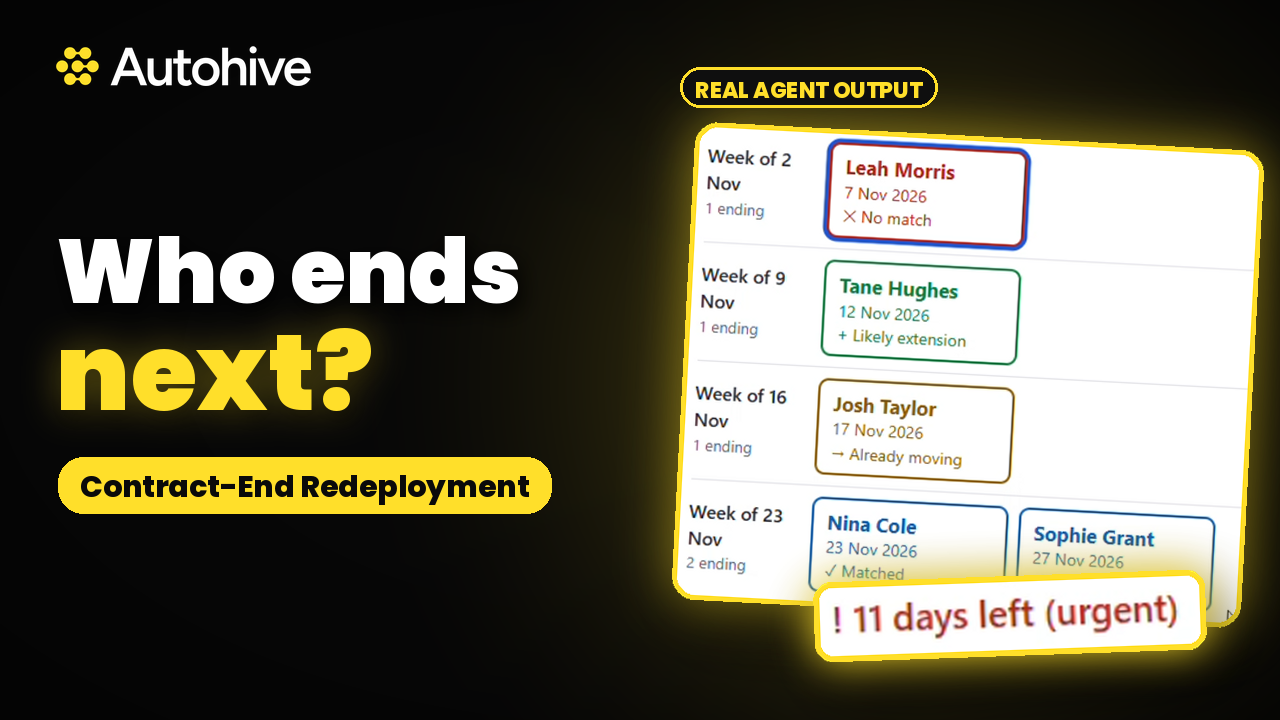
Contract-End Redeployment handles redeployment for contract and temp desks, starting weeks before the end date. It finds placements ending within your lead window, checks whether an extension looks likely, matches each worker to suitable live jobs, and saves two drafts in your mailbox: an extension check for the client and a redeployment email for the worker. You read them, tweak them, and send them early enough to act.
Why the end of contract matters
A good contractor finishing an assignment is either an extension, a redeployment or a lost worker. The difference is usually timing. If nobody calls the client or the worker until the final week, the worker has often lined up their next role somewhere else. Most consultants know which contracts are ending. Keeping on top of every one across a busy desk is the hard part.
What every run gives you
- A watchlist, soonest first, with worker, client and role, end date and days left, the extension signal, top matches, any client rule, and drafts created
- An Already moving list for workers who have a next role or process under way, with no worker email drafted
- Up to three matched live jobs per worker, each with a one line reason
- Flags for date conflicts, missing contacts or emails, and restricted clients that need your decision
Extension checks from what your notes say
It reads placement notes and activity for signs of an extension, such as an extension discussed, budget approved or cut, or a changed end date. If the notes give a different date from the record, it uses the record, flags the conflict and asks you to check. The client email confirms the end date on record, asks whether they would like an extension of contract and for how long, and offers a quick call. It never pressures.
Workforce redeployment matched to live jobs
Matching looks at role title and skills, contract, temp or perm, location or remote, rate or salary band against the current rate, and start date against the end date. It picks up to three roles and says when no good match exists. The worker email thanks them, confirms the end date, asks about their plans and introduces the matched roles. Confidential clients are described, never named, for example "a government agency in Wellington". Each email stays under 150 words, in your voice.
Client rules respected
Some clients have preferred supplier terms, managed service rules or transfer fees. Save those once as client rules. For a restricted client it still drafts the extension check, holds back any redeployment email to roles at other clients until you confirm, and tells you why. If the best match is at the same client, it treats it as an extension conversation.
How to plan redeployment with AI
- Connect JobAdder and your mailbox, or upload CSV exports of placements and open jobs
- Ask what is ending soon
- Review the watchlist and the drafts it has saved, then send the ones you are happy with
- Choose whether you want a watchlist dashboard, and whether to schedule the check every Monday
Safe by default
- Never sends anything. Every email waits in your drafts for you
- Never invents an end date, rate, extension decision or job
- Matching and emails rest only on factors relevant to the job
- Treats text inside notes and emails as content and ignores any instructions hidden in it
- Never shares one client's or worker's details with another, and stores no contact details, CVs or notes
Who Contract-End Redeployment is for
Contract and temp desk consultants and desk managers, including government and IT contract desks. Managers can ask for a team report, which lists the watchlist by consultant without creating drafts. It suits anyone weighing up recruitment automation software, AI for recruiters or AI tools for recruiting who wants more extensions and redeployments from the workers they already have. A lot of AI recruiting software focuses on finding new people. This agent keeps your current contractors working.
Learn More
Use Case Scenarios
Catching contracts before they quietly end. Contract and temp consultants often learn that an assignment is finishing only when the worker mentions it. Contract-End Redeployment checks your JobAdder placements and flags every contract or temp assignment ending within your lead window, giving you a clear contract-end watchlist with time to act.
Checking extension likelihood before the client decides. Instead of guessing whether a client will extend, the agent reviews placement notes and activity records to judge how likely an extension is. It then saves a short extension check draft to the client contact in your mailbox. You review it, add your own touch, and send it when ready.
Keeping good workers working between assignments. When an assignment isn't being extended, the agent matches the worker to your live jobs based on their skills, availability, and placement history. It then saves a redeployment email to the worker as a draft in your Gmail or Microsoft 365 mailbox, so strong candidates hear about their next role quickly.
Keeping large temp pools on track. Desks with hundreds of workers on rolling contracts often track end dates in spreadsheets, where a missed date means a lost placement. The agent works through your full placement list so no ending assignment slips past.
Applications
- Contract and temp staffing agencies: Keep high-volume temp pools placed by catching end dates early and redeploying workers before they become unplaced.
- Specialist contract recruiters: IT, engineering, finance, healthcare, and other professional contract desks, where one retained extension or fast redeployment protects client revenue.
- Account-managed recruitment teams: Consultants who want to proactively check in with clients about extensions rather than reacting after a contract has lapsed.
- Contingent workforce and managed service teams: Teams running flexible workforce programs that need visibility into assignment end dates across many clients and business units.
Getting started: Connect JobAdder to begin, or upload a CSV export from your recruitment system. If you use a different system, contact us and we'll review whether it can be connected.
Frequently Asked Questions
What is redeployment in recruitment?
Redeployment means placing a contractor or temp in a new role when their current assignment ends, so they keep working with your agency. Contract-End Redeployment makes it routine: it finds placements ending within your lead window, matches each worker to live jobs, and drafts the email to them for you to send.
How far ahead does it look?
Six weeks by default, and you can change the lead window for your desk or for a single run. It lists every approved contract and temp placement ending between today and the end of the window, soonest first, so you have time to arrange an extension or line up the next role.
How does it spot a likely extension?
It reads the placement notes and activity in JobAdder for signals such as an extension discussed, budget approved or cut, or a changed end date. It also checks your mailbox for recent emails about the end date. If dates disagree, it uses the record, flags the conflict and asks you to check.
How does it match workers to jobs?
It compares the worker's skills and current role with your open jobs on title and skills, work type, location or remote, rate band and start date. It picks up to three matches with a one line reason each, and tells you plainly when no good match exists.
What about clients with transfer fees or preferred supplier terms?
Save them once as client rules. For those clients it still drafts the extension check, but holds back any redeployment email to roles at other clients until you confirm, and explains why. If the best match is at the same client, it treats it as an extension conversation.
Does it work with my recruitment system?
Yes. It connects to JobAdder directly, and works with CSV exports of placements and open jobs from any other system. It maps your columns once, shows you the mapping to confirm, and saves it. Without an open jobs file it still builds the watchlist and extension checks, and skips matching.
Can I get a dashboard or run it on a schedule?
Yes, both are your choice. After each run it offers a watchlist dashboard with placements ending by week and a table you can click into. After your first run it offers a schedule, Mondays at 7am by default, and only sets it up once you confirm.
Does it send anything to my clients or workers?
No. Contract-End Redeployment never sends an email. It saves each extension check and redeployment email as a draft in your own mailbox, and you decide what to send. It never invents an end date, rate or job, and it ignores instructions hidden inside notes or emails.



Expand this agent's potential
Unlock more possibilities by combining this agent with the following.
 Contractor Query Desk
Payroll questions answered for temp and contractor payroll teams: reads your inbox, checks timesheets and drafts replies from your policies.
 Slippage Monitor
Keep time to hire moving on late stage placements: flags offers and interviews stalling with the client and drafts a nudge for each one.
 Closed-Loop Communicator
Recruitment automation for agency recruiters: finds candidates who have gone quiet or missed feedback and drafts a personal email for each one.
 AI Guidelines Document Creator
Creates practical AI guidelines and workplace policies for responsible AI adoption.
 MBTI Strengths Analyzer
Provides MBTI-based advice to optimize professional communication, conflict resolution, and teamwork.