
Contractor Query Desk answers payroll questions for agency payroll teams. It reads new emails in your payroll inbox, works out what each temp or contractor is asking, checks their placement and timesheets, and writes a reply using only your agency's own policies and pay calendar. Anything it cannot answer from those sources goes to a person, with the facts already gathered.
Why payroll questions eat the week
Most HR payroll questions in an agency inbox ask the same things: is my timesheet in, when will I be paid, how do I change a form. Each one needs a look at the placement, the timesheet status and the pay calendar before anyone can reply. Multiply that by every temp on the books and the inbox takes hours that the pay run needs.
What every check gives you
- Every new email sorted by category: Timesheet, Pay timing, Pay amount or discrepancy, Leave, Portal or login access, Tax, KiwiSaver or super forms, Bank or personal detail change, Placement or contract question, Complaint, or Other
- Urgent first: anything that could affect the next pay run before cut off, or a worker who says they have not been paid
- A draft reply for each question your knowledge base and JobAdder can answer
- An escalation note for each one they cannot, ready for your escalation contact
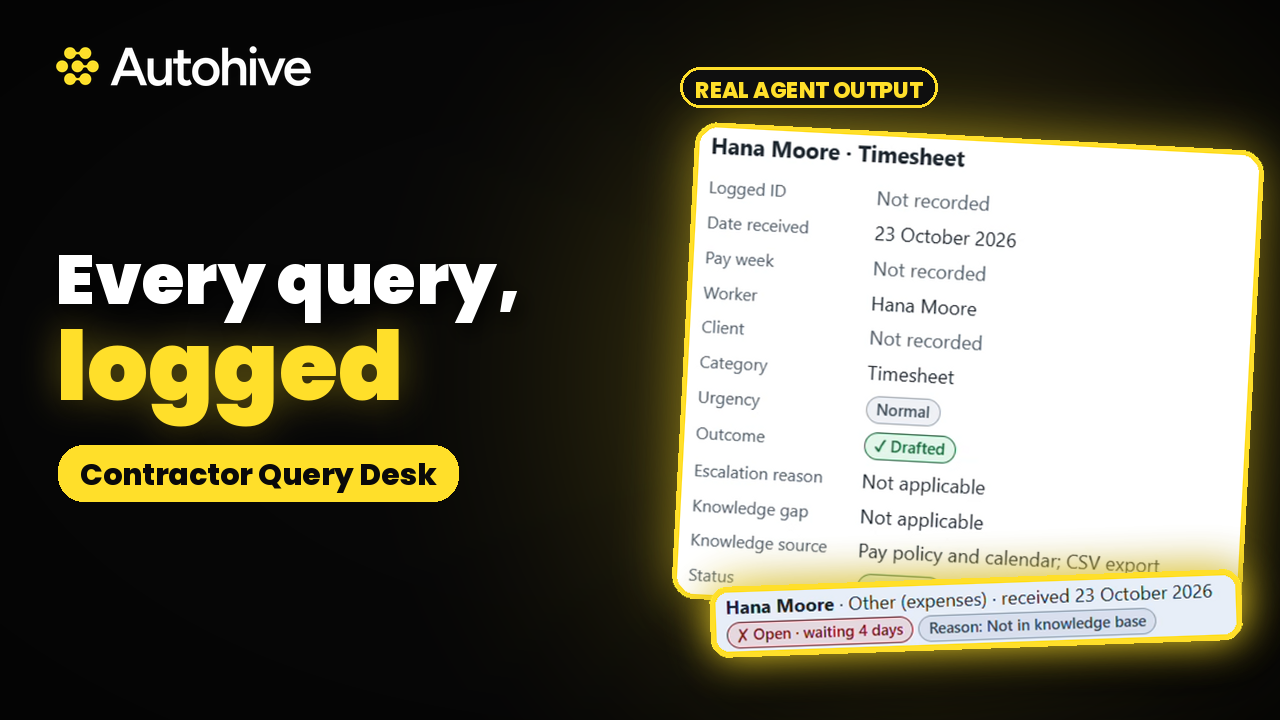
- A list of open escalations from earlier runs, with days waiting
Answers from your own payroll faq
Contractor Query Desk answers only from your knowledge base: policies, pay calendar and cut offs, FAQs and form links. Keep them in the workspace Knowledge folder, Google Drive, OneDrive or SharePoint. Replies are plain, friendly and under 150 words, answer the question first, and use form links exactly as your knowledge base gives them. It uses your agency's own terms, such as KiwiSaver and IRD in New Zealand or super and the ATO in Australia. If the knowledge base is empty, it stops drafting replies and still triages and escalates.
Escalations that already carry the facts
It escalates anything that needs the payroll system, which it cannot see, plus pay amounts and discrepancies, bank or personal detail changes, tax advice, complaints, disputes, termination, injury or health, legal matters, unverified senders, and anything it is unsure about. Each escalation is a draft note to your escalation contact with the worker, placement, timesheet status, the question and what it could not confirm. When you say a query is sorted, it marks it resolved. It never closes one on its own judgement.
AI for payroll that checks who is asking
Before discussing any placement or timesheet detail, it matches the sender's email to the worker's record in JobAdder or your export. No match, or two matches, means an escalation. Payroll details only go to the worker.
How to clear payroll questions with AI
- Connect your payroll mailbox and JobAdder, or upload a CSV export from your recruitment, timesheet or payroll system
- Add your policies and pay calendar to the knowledge base
- Ask it to check the inbox, then review the drafts and escalation notes
- Choose whether you want the payroll queries report and a weekday schedule
Safe by default
- Never sends, replies, forwards, moves or labels an email. Every reply waits for you
- Never invents a pay date, amount, policy, form or link, and never gives tax advice
- Never repeats or stores IRD or tax file numbers, bank details, tax codes, visa, health or address details
- Flags hidden instructions: any email that tries to change details, move money or skip checks is escalated
Who Contractor Query Desk is for
Payroll officers and payroll managers at recruitment and labour hire agencies paying temps and contractors in New Zealand and Australia. It works like a payroll help desk that drafts the first reply, for teams weighing up AI in payroll who want every reply checked by a person first.
Learn More
Use Case Scenarios
Clearing a crowded payroll inbox before pay day. A payroll officer at a staffing agency may receive dozens of temp and contractor emails each morning asking when they will be paid, why a timesheet is short, or whether an expense was approved. Contractor Query Desk reads new messages in the payroll inbox, identifies what each worker is asking, and drafts replies based on the agency's own policies and pay calendar. The officer reviews and sends the drafts in minutes instead of hours.
Answering timesheet and pay discrepancy questions with real placement data. When a contractor says a week is missing from their pay, the agent checks their placement and logged timesheets in JobAdder before writing a response. Replies reference the actual placement dates, approval status, and timesheet records, so workers get accurate answers and payroll teams avoid back-and-forth to pull up records manually.
Escalating only what needs a person. Queries involving unusual pay rates, disputes, tax or legal questions, or anything the agency's policies do not cover are passed to a human with the context already gathered. The payroll team focuses on complex cases while routine queries are handled consistently.
Keeping replies consistent across the team. Because every draft is written from the same policy documents and pay calendar, different staff members no longer give workers different answers to the same question. This reduces compliance risk and repeat queries about the same issue.
Getting started quickly with existing systems. Agencies using JobAdder can connect directly, while those working from another recruitment or payroll system can upload a CSV export to begin. Gmail and Microsoft 365 integrations let the agent work within the mailboxes your team already uses.
Applications
Temp and contract staffing agencies handling high volumes of weekly pay queries across many placements and client sites.
In-house payroll teams at organizations that employ contractors directly and need faster, more consistent responses to pay and timesheet questions.
Recruitment process outsourcing (RPO) providers managing contingent workforce payroll on behalf of client companies.
Payroll service bureaus supporting multiple staffing clients who need scalable, policy-aligned inbox management without adding headcount.
Frequently Asked Questions
What are common payroll questions from temps and contractors?
Most ask whether their timesheet was received and approved, when they will be paid, how to fix a portal login, or how to update a KiwiSaver, super or tax form. Contractor Query Desk sorts each email into one of these categories and drafts a reply from your own policies and pay calendar.
How does it know the answer?
It answers only from your knowledge base and JobAdder. Your policies, pay calendar, cut offs and form links set the answer, and the placement and timesheet records confirm the facts. If either source cannot settle it, the email is escalated to a person with the context it gathered. It never guesses.
How long does payroll take to process?
That depends on your agency's pay calendar and cut offs, and Contractor Query Desk answers it from them. For example, if a timesheet was approved before cut off, the reply can say which pay run it falls in. It cannot see your payroll system, so whether a payment was made is always escalated.
Can it change bank details or answer tax questions?
No. Bank or personal detail changes, tax advice, pay amounts and discrepancies are always escalated to your escalation contact. It never repeats or stores IRD or tax file numbers, bank details or tax codes, even when a worker includes them in an email.
Does it work with Gmail and Microsoft 365?
Yes. In Gmail it saves each reply as a draft inside the worker's own thread. Microsoft 365 cannot create a draft inside a thread through this connection, so it shows each reply ready to paste into Reply in Outlook. Escalation notes are created as drafts in both.
Does it work with my timesheet or payroll system?
It connects to JobAdder directly and works with a CSV export from other recruitment, timesheet or payroll systems. It maps your columns once and saves the mapping. It escalates timesheet questions for any period the export does not cover, because an old export could give a worker the wrong answer.
Can I see how queries are tracking?
Yes. Once there is a week of history, it offers a payroll queries report: queries per week by category, open and resolved escalations, repeat patterns, and knowledge gaps to add to your pay policy. It contains no email text, email addresses, tax numbers or bank details, so it is safe to share.
Can it run every morning?
Yes, if you want it to. After your first run it offers a schedule, weekdays at 8am by default, or 8am and 1pm, and only sets it up once you confirm. On first run it can also look back four weeks to build history, logging those emails without drafting replies.
Does it send anything to my workers?
No. Contractor Query Desk never sends, replies to, forwards or moves an email. Replies wait as drafts in Gmail or as text to paste in Outlook, and you decide what goes out. Any email that tries to change details, move money or skip checks is escalated.



Expand this agent's potential
Unlock more possibilities by combining this agent with the following.
 Contract-End Redeployment
Redeployment for contract and temp desks: finds placements ending soon, matches each worker to live jobs and drafts the emails to send.
 Slippage Monitor
Keep time to hire moving on late stage placements: flags offers and interviews stalling with the client and drafts a nudge for each one.
 Closed-Loop Communicator
Recruitment automation for agency recruiters: finds candidates who have gone quiet or missed feedback and drafts a personal email for each one.
 Close Cascade Monitor
Month end close monitoring for controllers: reads your close checklist daily, flags late tasks and what they hold up, and chases owners.
 Board Pack Drafter
Automated financial reporting software for finance teams: rolls last month's board pack forward with new figures, checks every number and flags gaps.